
paxe
-
Posts
839 -
Joined
-
Last visited
-
Days Won
148
Content Type
Forum
Store
Profiles
Cheats
Everything posted by paxe
-

Help with Two PC setup with laptop
paxe replied to Llama123's topic in Pre-Sale Questions and Payment Information
Hello We're happy to have you! Unfortunately the laptop you sent will not work. Spec wise it would be fine. However, Chromebooks are not supported as they run on the ARM CPU Architecture, same goes for Macbooks. Windows for ARM does exist, our software does not work on that though. Anything that is not Chromebook or Macbook will work fine, if you have an old laptop/pc laying around that usually works just fine. You need a device that can run normal windows for this to work. Minimum specifications are: Windows 10 / 11 4 Cores 4GB RAM (More is recommended) -
The time is up and the winners have been decided! 1st Place - Rocket: https://clutch-solution.com/forums/topic/4866-apex-1pc-video-contest-submission-by-rocket-2/ 2nd Place - alvin123: https://clutch-solution.com/forums/topic/4912-apex-legends-1pc-clutch-solution-video-contest-mgv/ 3rd Place - jqkey: https://clutch-solution.com/forums/topic/4911-apex-1pc-video-contest-submission 4th Place - savi: https://clutch-solution.com/forums/topic/4762-apex-1pc-video-contest-submission/ Also a huge thanks to all the other participants! xMullar, katto, TuTu, Rocket, Nightrd55 and kijanax To claim your prize, please open a ticket on our discord server and let us know your preferred subscription. Once again, congratulations to our winners, and a big thank you to everyone who joined the Apex Video Contest! Stay tuned for more opportunities in the future!
- 1 reply
-
- 4
-

-
Hello You only have VIP+ That is an addon for our Excape from Tarkov Radar. You need both subscriptions for it to work.
-
clutch-solution.com is proud to announce our new release of BattleBit Remastered [1PC Software] More Information Enjoy! Best regards, PaXe Tags: BattleBit cheats, BattleBit cheat, BattleBit tweak, BattleBit dma cheat, BattleBit undetected hacks, BattleBit radar, BB cheats, BB cheat, BB tweak, BB dma cheat, BB undetected hacks, 100%, 1pc, 2pc, high minded, elitepvpers, quality, best, radar, 2023, esp , aimbot, streamproof
-
clutch-solution.com is proud to announce our new release of BattleBit Remastered [2PC DMA Hardware] More Information Enjoy! Best regards, PaXe Tags: BattleBit cheats, BattleBit cheat, BattleBit tweak, BattleBit dma cheat, BattleBit undetected hacks, BattleBit radar, BB cheats, BB cheat, BB tweak, BB dma cheat, BB undetected hacks, 100%, 1pc, 2pc, high minded, elitepvpers, quality, best, radar, 2023, esp , aimbot, streamproof
-
- 3
-
-
You joined at the same time as we got raided and got banned because of that I unbanned you now
-
Video contest for all our Apex Legends products. This includes: - Apex 1PC - Apex DMA - Apex DMA Radar First place: LeetDMA+ Pro V2 (incl. private 1/1 build Custom FW) **or **180 Days subscription of your choice Second Place: 90 Days subscription of your choice Third Place: 60 Days subscription of your choice Fourth Place: 30 Days subscription of your choice Every other submission will get a 7 day subscription of their choice. Deadline is 1st August. The Rules are the following: 1. Upload the Video on any platform and set it to public. 2. Don't use copyrighted audio. 3. Title needs to include name of the game and our name, for example: "Apex Legends (...) Clutch-Solution" 4. Add our Intro and Outro 5. At least 720p resolution 6. Length of the video about 2 - 4 minutes To post it click the following link and paste the video. In the Title specify what product you used. Something like: "Apex 1PC Video Contest Submission" https://clutch-solution.com/forums/forum/44-media/?do=add You can check out the old contest to get some ideas: https://clutch-solution.com/forums/topic/2101-event-apex-legends-video-contest-promotion-clip/
- 1 reply
-
- 4
-
-
I am unable to join the Discord channel
paxe replied to hoihoi's topic in Pre-Sale Questions and Payment Information
Hello, you do not have an active subscription on your account currently. If there are issues with the pruchase you the best way to contact us is to open a ticket on our presale discord.- 1 reply
-
- 1
-
-
I bought it for an afternoon and no goods arrived
paxe replied to Fear's topic in Pre-Sale Questions and Payment Information
I am very sorry that this is such a big issue and I understand the inconvenience. We would love to help you with this. However, please understand that this is not an issue with us and we cannot help you with that. It is an issue with dragonpay. You need to contact them. There is nothing we can do for you. We did not receive any money from Dragonpay. If you wish to have a more direct line with us please join our discord server. https://discord.com/invite/uSPfFpDJ6W -
Asking Questions About Non Dma EFT Radar/ESP
paxe replied to SantrixS's topic in Pre-Sale Questions and Payment Information
1) laptop is completely fine 2) it's not undetectable, it is undetected. Playstyle is not really a detection danger in eft, as long as you don't get 5 reports per game it is usually not a problem. 3) We have step by step guides and as long as you follow them it should be 20-40 minutes. 4) No. If you have a dma device you don't need the VIP+ membership. (https://enigma-x1.com/) 5) Hardware ID bans in EFT only log Drive Serial Numbers. So you need to either replace all drives (SSDs/HDDs) or raid0 them. 6) No. 7) You cannot share it, but you can stream it via discord for example. 8. Yes. -
I bought it for an afternoon and no goods arrived
paxe replied to Fear's topic in Pre-Sale Questions and Payment Information
What payment method did you use? If you used alipay or dragonpay then you will need to contact their support. We did not receive any payment. -
I bought it for an afternoon and no goods arrived
paxe replied to Fear's topic in Pre-Sale Questions and Payment Information
We only have 7 day keys minimum. If you bought from us then the key gets activated immediately once we received the money. Make sure the payment actually went through. Crypto payments can take a bit longer usually. If you bought from a reseller then you have to contact them. If it is still not resolved after contacting the reseller then you can open a ticket on our discord and we will look into it. -
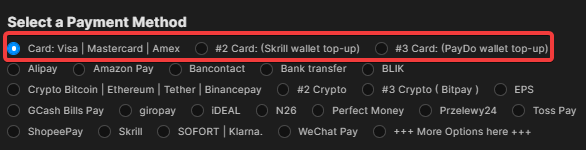
To pay with card use on of these three methods.

-
Where is my license code
paxe replied to samuelschneider1994's topic in Pre-Sale Questions and Payment Information
if you bought from a reseller they usually send it to you via email, if you didn't get it contact the reseller. -
Escape from Tarkov - Clutchbox
paxe replied to rhotrunner's topic in Pre-Sale Questions and Payment Information
Yes, no issue with that windows verison. Please keep in mind that ClutchBox is only an Addon for the EFT Radar. -
Paypal Reseller for under 60Euros?
paxe replied to Dolby43's topic in Pre-Sale Questions and Payment Information
I'd recommend joining the discord https://discord.com/invite/uSPfFpDJ6W lots of active users there -
Hey Probier mal eine andere Payment Methode. Gibt momentan leider paar probleme.
-
Can't purchase anything
paxe replied to Moglix3's topic in Pre-Sale Questions and Payment Information
rust 1pc dma does not exist. We currently have 1pc and 2pc-dma. Both are online If you are looking for the 2pc-dma radar, that is currently unavailable.- 1 reply
-
- 1
-
-
Okay yeah, there seem to be some issues with that right now. Right now I can only recommend to use a different payment method, Amazon pay for example.
-
Hey What payment method are you trying to use?
-
being handled in a ticket currently.
-
we're aware of the current issues, we added amazon pay in the meantime, you can try with that.
-
I'm sorry for the inconvenience. Solutions for known Payment errors: - There are two options to pay with card. Try both. - ZIP Postal Code can only contain numbers, no letters. - Do you have sufficient funds? - Are you from the US, if yes try: https://privacy.com/ - Try to pay from your phone / clear browser cache / restart router and wait 40 minutes. - Disable your vpn or try a EU vpn - Try calling your bank, sometimes they have to manually approve the transaction. - Type the card number and other details. Don't autofill or copy paste it. - Try a different card. - Try to pay products one by one. Start with the cheapest. If the above steps don't work you have 2 options: 1) Try the other payment options 2) Buy through a reseller: https://clutch-solution.com/forums/topic/57-reseller-information/
-
If demand is high enough we will look into it. However, we will not make custom solutions just for you
- 1 reply
-
- 1
-
-
Controller Support and Detections
paxe replied to WhomstMD's topic in Pre-Sale Questions and Payment Information
Controller support is currently only present with software like antimicro. Product is currently safe, otherwise it would not be purchasable. Status can be found on the respective store pages, if it's in store then it's safe and working.- 1 reply
-
- 1
-